

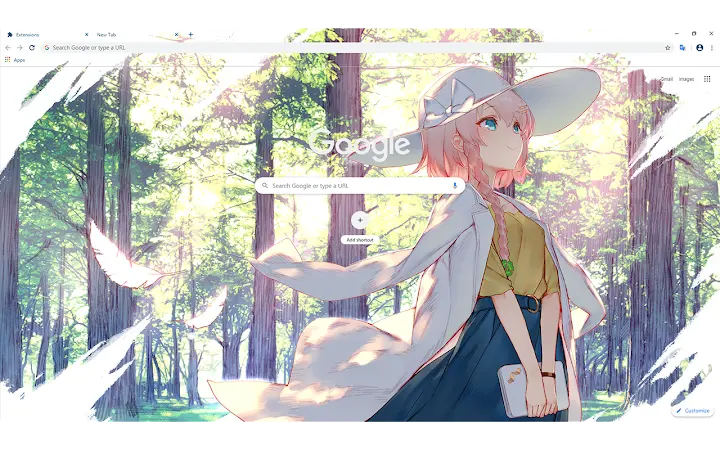
Description
Download Yotsuha Izumi Theme – Browser & Desktop Themes
The Yotsuha Izumi Theme is a desktop and browser customization utility designed to enhance visual appeal with a high-resolution wallpaper featuring the character Yotsuha Izumi. Targeted at fans of anime and digital art, it offers a seamless way to personalize workspaces. The theme supports both Windows and Mac operating systems, providing a consistent aesthetic across platforms. Ideal for users who value immersive desktop experiences and enjoy customizing their digital environments with beloved characters. Real-world usage includes personalizing home computers, enhancing productivity through visual motivation, and creating a unique workspace for creative professionals. The developer did not provide additional details about the software’s functionality beyond theme application.
Key Features & Capabilities
- High-Resolution Wallpaper – The theme includes a 1920 x 1080 image optimized for full HD displays, ensuring sharp visuals and vibrant colors when set as a desktop background.
- Multi-Platform Support – Compatible with both Windows and Mac operating systems, allowing users to apply the theme across different devices without compatibility issues.
- Browser Theme Integration – Designed to pair with browser extensions or tools that support custom themes, enabling synchronized visual styling across desktop and web environments.
- Optimized Display Settings – Recommended for use with a 100% display scaling and a small taskbar to achieve the intended visual layout and maximize screen real estate.
- Lightweight Installation – At just 2.5 MB, the theme file is compact and quick to download and apply, minimizing system resource usage during setup.
The theme is ideal for users who want to quickly refresh their digital workspace with a visually striking character design. By applying the wallpaper and syncing it with browser themes, users can create a cohesive aesthetic. This setup is particularly beneficial for fans of anime or digital illustration who seek to personalize their devices with content they love. The integration with browser themes enhances the immersive experience, making the entire interface feel unified. No additional tools are required beyond standard OS settings and compatible browser extensions.
User Interface, Workflow & Performance
The user interface of the Yotsuha Izumi Theme is minimal, as it primarily functions as a visual asset rather than a full-featured application. Users interact with the theme by applying the provided image as a desktop background and configuring browser extensions if supported. The workflow is straightforward: download the theme package, extract the image file, and set it as the wallpaper through the operating system’s display settings. For browser integration, users may need to manually configure their browser’s theme settings using the provided image.
Navigation within the theme itself is non-existent, as it does not include a GUI or interactive controls. The experience is entirely passive—once applied, the theme remains static until manually changed. Performance impact is negligible, given the theme’s small file size and lack of background processes. The developer did not specify resource usage details, but based on general software behavior, such lightweight assets typically consume minimal CPU and RAM. Stability is expected to be high, as the theme does not introduce additional system load or dependencies.
Compatibility & System Requirements
The Yotsuha Izumi Theme is designed for use on Windows and Mac operating systems, with no specific version requirements mentioned. The software version is 1.0, indicating a stable initial release. The installation size is 2.5 MB, which is small and suitable for most devices. Exact system requirements were not listed, so users should ensure their devices support standard desktop wallpaper customization and browser theme functionality.
Platform compatibility information is limited to the operating systems provided. The theme is intended for use with desktop environments that allow custom wallpaper assignment and browser theme integration. Users are advised to follow the recommended display settings—1920 x 1080 resolution and 100% scaling—to achieve optimal visual results. The taskbar should be set to a small size to prevent visual distortion or cropping of the image. Compatibility with third-party tools or extensions is not confirmed and depends on individual user setups.
Pros and Cons
Pros
- High-quality 1920 x 1080 wallpaper for sharp visual clarity
- Available for both Windows and Mac users
- Lightweight at only 2.5 MB
- Designed for optimal display with recommended settings
- Free to download and use
Cons
- No interactive features or dynamic elements
- Requires manual setup for browser theme integration
- Dependent on external tools for full functionality
- Exact system requirements not specified
- Static theme with no animations or responsive design
FAQ Section
Is the Yotsuha Izumi Theme free to use?
Yes, the theme is available at no cost. It can be downloaded and applied without any payment or subscription.
What operating systems are supported?
The theme is compatible with both Windows and Mac operating systems. No specific version details were provided.
How do I apply the theme to my desktop?
Download the theme package, extract the image file, and set it as your desktop wallpaper using your operating system’s display settings. Ensure your screen resolution is set to 1920 x 1080 and scaling is at 100% for best results.
Can I use this theme with my browser?
Yes, the theme can be used with browsers that support custom themes. You may need to manually configure your browser’s appearance settings using the provided image.
Does the theme require an internet connection to work?
No, once installed, the theme functions entirely offline. It does not require an active internet connection to display or operate.
Final Thoughts + CTA
The Yotsuha Izumi Theme delivers a focused and visually appealing experience for fans of anime and digital art. While it lacks advanced features or interactivity, its simplicity is its strength—offering a clean, efficient way to personalize your desktop and browser environment. The lightweight design ensures fast setup and minimal impact on system performance. With support for both Windows and Mac, it provides broad accessibility. Users who appreciate aesthetic customization and enjoy integrating beloved characters into their digital space will find this theme satisfying. The recommended display settings enhance the visual fidelity, ensuring the artwork is displayed as intended. For those seeking a free, easy-to-use desktop enhancement, this theme is a solid choice. Download Yotsuha Izumi Theme now to transform your workspace with a stunning character-inspired design.
Guides & Tutorials for Anime Girl Theme for Chrome
How to install Anime Girl Theme for Chrome
- Click the Preview / Download button above.
- Once redirected, accept the terms and click Install.
- Wait for the Anime Girl Theme for Chrome download to finish on your device.
How to use Anime Girl Theme for Chrome
This software is primarily used for its core features described above. Open the app after installation to explore its capabilities.
User Reviews for Anime Girl Theme for Chrome 0
No reviews found





